Product · Klarvai AI Governance Platform
All of your company’s AI, through one governed front door.
Klarvai AI Governance Platform is the software a company uses to give AI to its whole workforce without losing control: a ChatGPT-like interface for people and a single control plane for IT, security and management. You decide which models, data and tools sit behind it.
For companies on Microsoft 365 that already use AI in a scattered way and need to bring order to it. Deployed in your own Azure.
- Sign-in with Microsoft Entra ID
- Models from several providers
- Permissions, limits and logging
The goal
From scattered AI to governed AI.
Today every employee uses whatever AI they like, with their own account and no rules. The platform exists so the whole company uses AI from one place, with approved models, authorised data and tools under control.
Today
- A different model per employee and personal accounts on external services.
- Internal data pasted into tools nobody has reviewed.
- Duplicated licences and costs that appear in no report.
- Nobody knows what was asked, with which data, or what was answered.
With the platform
- One entry point with the company sign-in.
- Only approved models and only the documents each person may see.
- Visible cost per user, department, assistant and model.
- Logging, audit and immediate shutdown of any piece.
- Your AIApproved, interchangeable models, without depending on a single provider.
- Your dataDocuments, conversations and logs stay inside your environment.
- Your rulesPermissions, limits and policies defined by the company, not the vendor.
- Your infrastructureIn your Azure, on a private network, with your own secrets in Key Vault.
The problem is not using AI. The problem is using it without governance.
The modules
One platform, eight modules.
Each capability ships as part of an integrated suite operated under a single brand. Start with the essentials and add modules as usage grows.
-
Klarvai AI Workspace
The interface for working with AI: chat, assistants per department, agents and documents, with your company’s branding and language.
- Chat and assistants
- Custom agents
- Knowledge search
- Documents and files
-
Klarvai Control Plane
The point every request to a model or tool passes through, with permissions, limits, policies and logging.
- AI Registry
- Policy Engine
- Approval workflows
- FinOps and audit
-
Klarvai AI Runtime
Picks the right model for each request and keeps working if a provider fails.
- Smart routing
- Provider fallback
- Keys and providers
- Limits and caching
-
Klarvai Tool Gateway
The secure connection to your systems. Every tool has a permission per team and per action; sensitive actions wait for a person.
- MCP and API gateway
- ERP, CRM, SQL and API connectors
- Per-action permissions
- Human approval
-
Klarvai RAG & Knowledge
Corporate knowledge with permissions: what a person cannot open in SharePoint, the AI does not use.
- SharePoint and OneDrive ingestion
- Semantic search
- Per-document access control
- Verifiable context
-
Klarvai Guard
Data protection on input, context and output. Not just the model: the whole flow.
- PII and secret detection
- Prompt injection prevention
- Content moderation
- Output policies
-
Klarvai Observe
Observability with privacy: the logging level is decided per application, from full to no content.
- Traces and metrics
- Usage per user and team
- Costs and tokens
- Alerts and SIEM export
-
Klarvai Identity
Identity with Microsoft Entra ID. Joiners, movers and leavers follow the directory: change department and your permissions change; leave and you lose access.
- SSO and MFA
- Synchronised groups and roles
- Automatic provisioning
- Optional SCIM
How it works
A familiar experience for employees. Control for the company.
Microsoft Entra ID groups define which models, assistants, tools and documents each person may use. Documents keep their SharePoint permissions and agents inherit those same limits.
What each employee sees
- A chat with history, files and the models approved for their group
- Assistants per department: general, IT, Finance, HR, Data and Documents
- Search across the documentation they are allowed to see
- Agents with tools connected to the systems
- Their SharePoint and OneDrive files
What the company controls
- Which models and providers are used, and for what
- Permissions per Entra ID group
- Which data enters the context of each answer
- What each agent may run and with what approval
- Budgets, limits, logging and emergency shutdown
What an agent may do on your behalf
- ReadMay query data and documents.
- WriteMay create or modify permitted records.
- Sensitive actionNeeds a person’s confirmation before it runs.
- ForbiddenNever allowed, not even with approval.
| Read invoices | Read |
|---|---|
| Query the ERP | Read |
| Generate a report | Read |
| Create an invoice | Approval required |
| Modify a supplier | Forbidden |
| Make a bank transfer | Forbidden |
The agent prepares the work and stops before any action with consequences: a person reviews and confirms.
Security
We protect the whole AI flow, not just the model.
Input, context, model, tools and output carry different risks. Each point has its own controls.
-
Input
Risks
- Prompt injection and jailbreak
- PII and secrets in the prompt
Controls
- Input guardrails
- PII detection
-
Context
Risks
- Indirect injection
- Data leakage
Controls
- Permission-aware RAG
- Authorised sources only
-
Model
Risks
- Model abuse
- Uncontrolled consumption
Controls
- Approved models only
- Limits and budgets
-
Tools
Risks
- Unsafe execution
- Malicious MCP servers
- Excessive autonomy
Controls
- Approved MCP catalogue
- Per-tool permissions
- Human approval
-
Output
Risks
- PII or secret leakage
Controls
- Output guardrails
- Logging and audit
Everything is deployed in an EU region, on a private network, with secrets in Azure Key Vault. And from the control plane you can instantly disable a model, a provider, an agent, a tool or a department, without stopping the platform.
Costs and quality
From token cost to business value.
Visible cost per user, department, agent and model. Quality measured before every change. Observability with the privacy level each department decides.
FinOps and measured return
Every department sees what it consumes, per assistant and per model, with optional chargeback. Routing sends simple requests to an economical model and complex ones to an advanced model. Return is measured during the pilot with real tasks, before and after: no assumed figures.
Quality before every change
Every new version of an assistant’s instructions, or a model change, is tested against 50 to 100 real company questions. We measure grounding, relevance, task completion, PII leakage and cost per answer. Nothing reaches production without being compared with the previous version.
Observability with privacy
The better the observability, the more sensitive data it can store. So the logging level is decided per application: full for the general assistant, metadata only for HR, anonymised for customer service, no content for highly sensitive flows.
Compliance
Ready for the EU AI Act.
The platform does not certify compliance: it provides the traceability, controls and evidence that make it possible.
What the platform provides
- Inventory of every AI system with owner, purpose, data and risk
- Usage logs, traces and exportable evidence for audits
- Applied permissions and policies, with human approval on sensitive actions
- Approval workflow and lifecycle: business, IT, security and legal
- Incident management with export to SIEM or ITSM
- Templates for the AI Act, ISO/IEC 42001 and NIST AI RMF
- Feb 2025Prohibited practices and AI literacy for staff (art. 4).
- Aug 2026General application. Transparency: telling people they are talking to an AI (art. 50).
- Dec 2027High-risk systems under Annex III, for example AI used to select staff.
- Aug 2028High risk in regulated products (Annex I).
Timeline after Regulation (EU) 2026/1744, which postponed the high-risk obligations. Check the dates with your legal advisers.
Where it fits
Each kind of solution solves part of the problem.
Klarvai integrates the pieces and operates them in your environment. It is neither just an AI licence nor just a compliance tool, and it coexists with Copilot and with what you already have.
| Kind of solution | Examples | Approach |
|---|---|---|
| AI workspace | ChatGPT Enterprise | One vendor’s corporate assistant, with SSO, permissions and company knowledge. |
| Microsoft ecosystem | Microsoft Foundry, Copilot, Purview | AI built into Microsoft 365 and Azure, with data governance. |
| Governance, risk and compliance | OneTrust, IBM watsonx.governance, Credo AI | AI inventory, risk assessment and approval workflows. |
| AI gateway | Kong AI Gateway, Portkey | Technical control of traffic to models and tools. |
| Klarvai | Integrated platform + implementation | Experience, control, knowledge and agents, in your cloud and operated by Klarvai. |
Architecture
Everything in your Azure, on a private network.
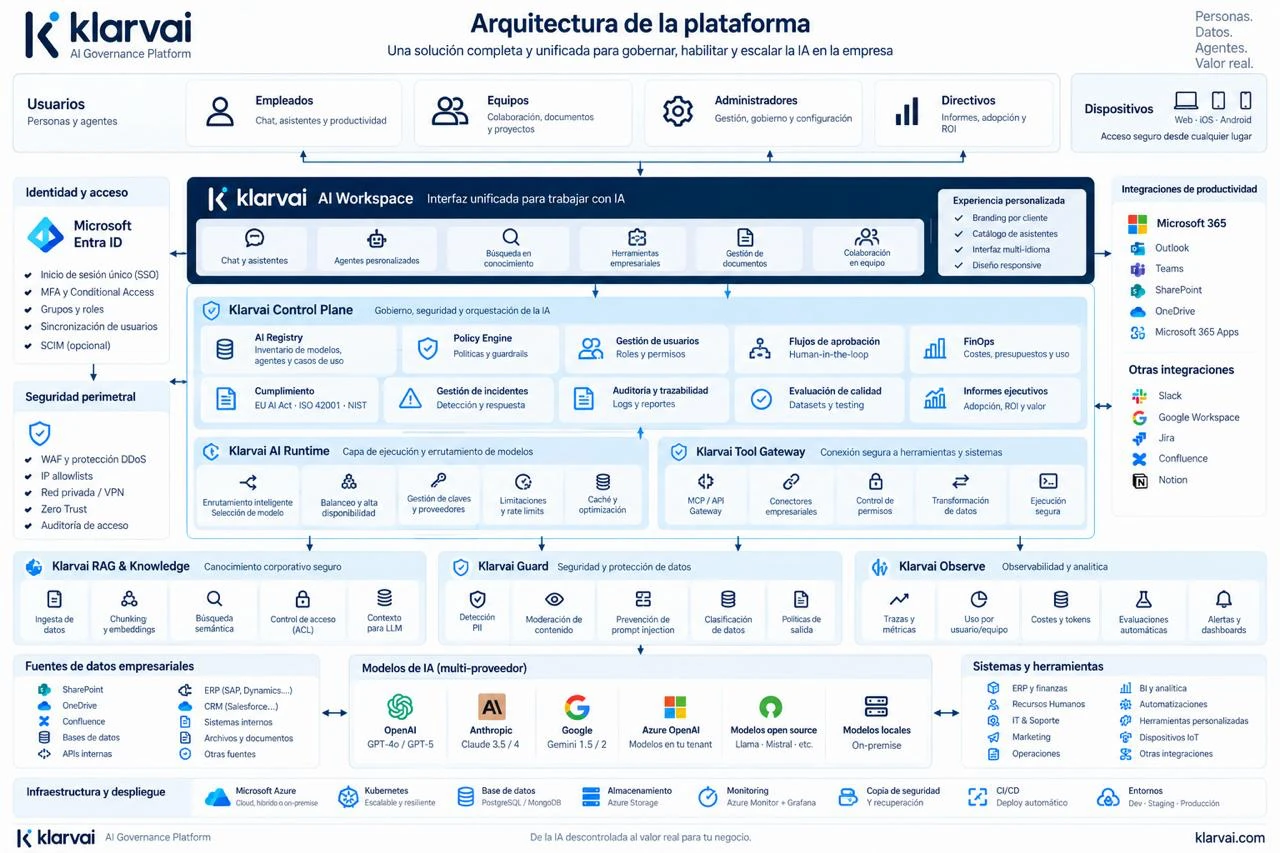
Users, identity, Workspace, Control Plane, Runtime, Tool Gateway, RAG, Guard and Observe on top of your data sources, models and systems, with secrets in Azure Key Vault. It can also run in a Klarvai dedicated cloud or in a private or hybrid environment. The diagram is in Spanish.
It connects with Microsoft 365, SharePoint and OneDrive, Teams, Slack, Jira or Confluence; with your ERP, CRM, databases and internal APIs; and with Azure OpenAI, OpenAI, Anthropic, Google Gemini, open and local models. These names are options we evaluate in each project, not a guarantee of compatibility.
How to start
A six-week pilot to decide with data.
25 users, two assistants and a final report to decide on scaling. It is the shortest way to see the platform working with your data.
The pilot includes
- 25 users from IT, Administration and Management
- Sign-in with Entra ID and 2 model providers
- 2 assistants with permission-aware SharePoint and OneDrive
- Data protection policies and a usage and cost dashboard
- Evaluation with 50 to 100 real questions
- Initial training and a final report with a roadmap
What we measure
- Adoption
- Cost per user
- Satisfaction
- Time saved
- Answer quality
- Blocked requests
- Models used
- Use cases identified
Then, implementation in stages
-
Weeks 1–7
AI Foundation
Platform in your Azure with Entra ID, approved models, limits, guardrails and logging.
-
Weeks 8–13
Pilot
A scaling decision backed by data from 25 users and 3 departments.
-
Weeks 12–16
AI Knowledge
RAG with SharePoint permissions and assistants for every department, across the organisation.
-
Weeks 17–28
AI Agents
Agents connected to the ERP, SQL and APIs with per-action permissions and human approval.
After implementation, Klarvai Managed AI operates the platform: monitoring, updates, backups, a monthly governance and FinOps report, quality evaluations and support with an SLA. Training for administrators and staff is included.
We do not publish prices: the amount depends on the number of users, the modules and the systems to connect. After a first conversation we deliver in writing the scope, timeline and price of the pilot and of the deployment.
Questions about the platform
What exactly is the platform for?
So the whole company uses AI from one place and under the company’s rules. Employees work with a chat, assistants and agents; IT, security and management decide which models, data and tools sit behind it, with what permissions and at what cost, and see everything logged.
Where is it deployed?
The reference option is your company’s Azure subscription, on a private network, with your own secrets in Key Vault and in an EU region. It can also run in a Klarvai dedicated cloud or in a private or hybrid environment with local models.
Which AI models can be used?
Azure OpenAI, Anthropic Claude, Google Gemini, open models such as Llama or Mistral, and local models. The company decides which are approved and for which groups. Routing picks the model per request and switches provider if one fails.
Does it replace Microsoft Copilot or ChatGPT Enterprise?
Not necessarily. Klarvai is the layer that connects people, models, data and systems under the company’s policies. It coexists with Copilot and the Microsoft 365 tools, and lets you use several model providers through a single governed front door.
How is confidential information protected?
Documents keep their SharePoint permissions when indexed, so the AI never uses what the person cannot open. Guard detects PII and secrets on input and output, and the logging level of each application is agreed with the department: full, metadata only, anonymised or no content.
Does it guarantee compliance with the AI Act?
No. No platform certifies compliance. It provides what makes it possible: an inventory of AI systems, traces, applied policies, human approval, versioned evaluations and exportable evidence, with templates for the AI Act, ISO/IEC 42001 and NIST AI RMF.
How long does it take and how much does it cost?
The pilot takes six weeks with 25 users; in a full deployment the platform is in use from week 8 and the knowledge and agent stages run to roughly week 28. We do not publish prices: they depend on users, modules and systems, and we deliver them in writing after a first conversation.
Tell us which task you want off your plate
We reply by email to arrange a first conversation. If automating it makes sense, we prepare the diagnosis with the scope and the quote in writing.
- A map of today’s process and what to automate.
- Human review points and required tools.
- Written scope, timeline, budget and potential time savings.
- [email protected]
- +34 644 013 929
- Where
- Barcelona
Rather talk it through? Pick a slot in the diary: 15 or 30 minutes, your choice.
Book a call